How do you make a technical product legible without oversimplifying it?
COMPANY
Oracle
ROLE
UX Strategist/PMM/UX Writer
Main ProblemS
Information Architecture/UX Writing
YEAR
2022
+40%
+35%
+25%
The Problem
Blockchain is genuinely hard to understand. Oracle's landing page was making it harder.
The Oracle Blockchain landing page was written for people who already understood the technology. Dense, feature-first copy assumed a level of familiarity that most enterprise buyers simply didn't have. Non-technical decision-makers faced a wall of terminology before they'd been given a single reason to care.
At the same time, technical users who did understand blockchain found the page unhelpfully vague on the specifics they needed. The page was somehow too complex for buyers and too simple for engineers, serving neither audience well.
The Goals
Three constraints that shaped every decision.
02
03
WHO I WAS DESIGNING FOR
Two distinct people. One page. Different needs at every scroll depth.
The research surfaced two audiences whose needs were almost opposed — and who both needed to feel like the page was built for them. The design couldn't optimize for one without actively considering the other.

WHAT I NOTICED
The page had an audience problem disguised as a content problem.
Research with internal teams and a cohort of existing customers revealed that people were interested in the product — they just couldn't navigate to why it mattered. The cognitive load wasn't from having too much information.
It was from having the wrong information in the wrong order for the wrong reader.
Legibility isn't about making things simpler. It's about making the right things visible to the right person at the right moment.
KEY INSIGHT
Non-technical buyers needed to understand blockchain's value within their industry before they could evaluate any feature. Industry-first organization wasn't a UX nicety — it was the condition for clarity.
The Structural Shift
The reframe: don't simplify the product. Sequence the complexity.
The core architectural decision was to meet each reader at their level of understanding rather than assuming. Non-technical buyers needed a reason to care before they could evaluate features. Technical users needed a clear path to specifics without wading through introductory material.
Organizing use cases by industry rather than feature was the hinge. Finance, supply chain, healthcare — buyers could immediately find themselves in the page.
Copy-first wireframes drove the process — establishing message hierarchy before layout meant the design team built into the content's logic rather than retrofitting copy into existing components.

UX Copy clarification
The content in the hero was trying to do too many things at once. So we had to clarify the value and we chose ot lead with benefit led messaging that matched the problem of the main persona: the overwhelmed user.
Tabbed navigation bundled the information architecture.
Overview, features, pricing, and FAQ moved under one tabbed section. A direct path to sought-after information without requiring the reader to already know where to look.
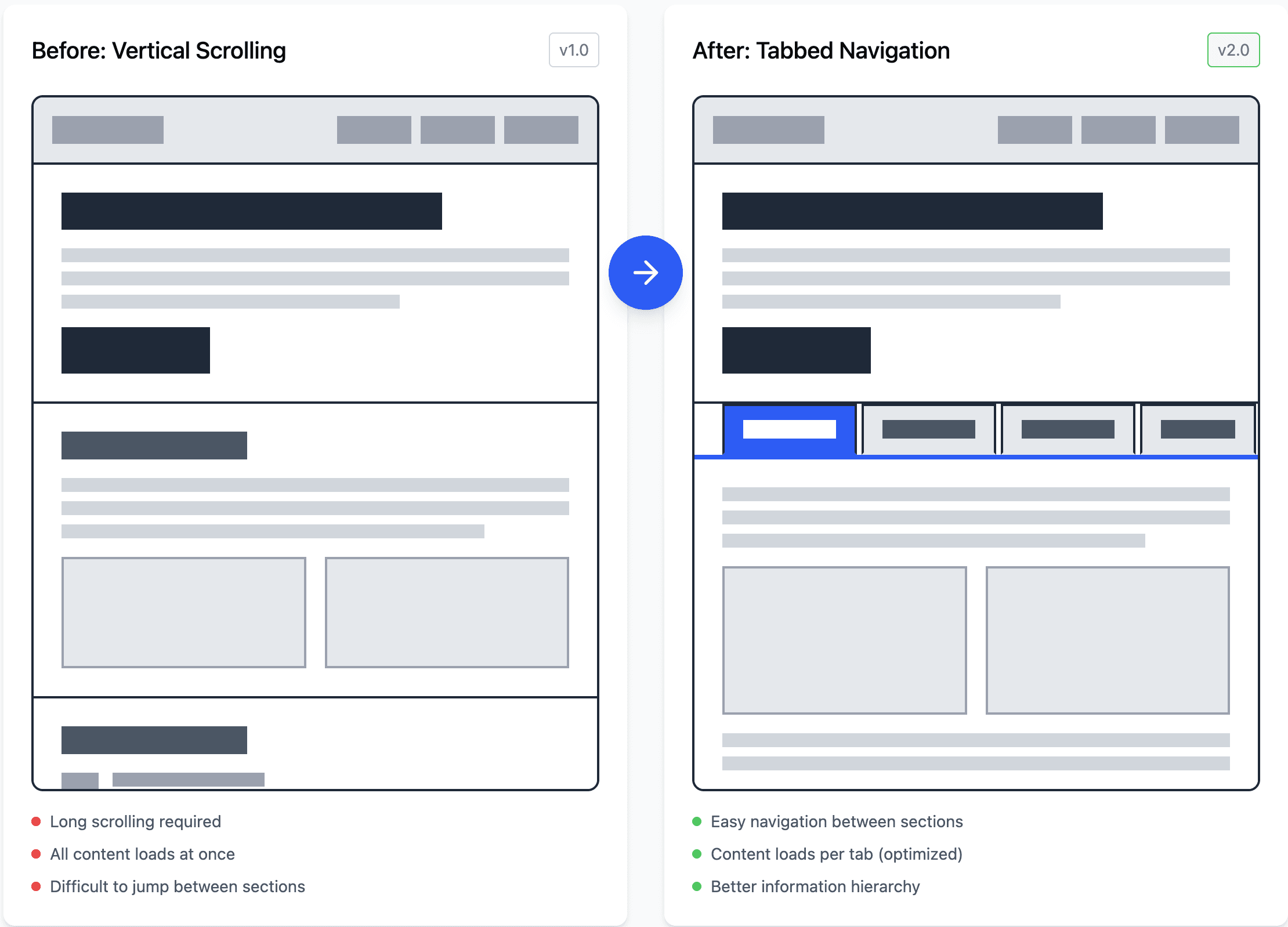
Overview, features, pricing, and FAQ were surfaced as separate, equally weighted sections — forcing users to decide what mattered before they had enough context. In the mid-fidelity, we realized that the tabs took up too much real estate in the web experience, so we wanted to make sure that there was enough negative spacing so that the content could breathe better.
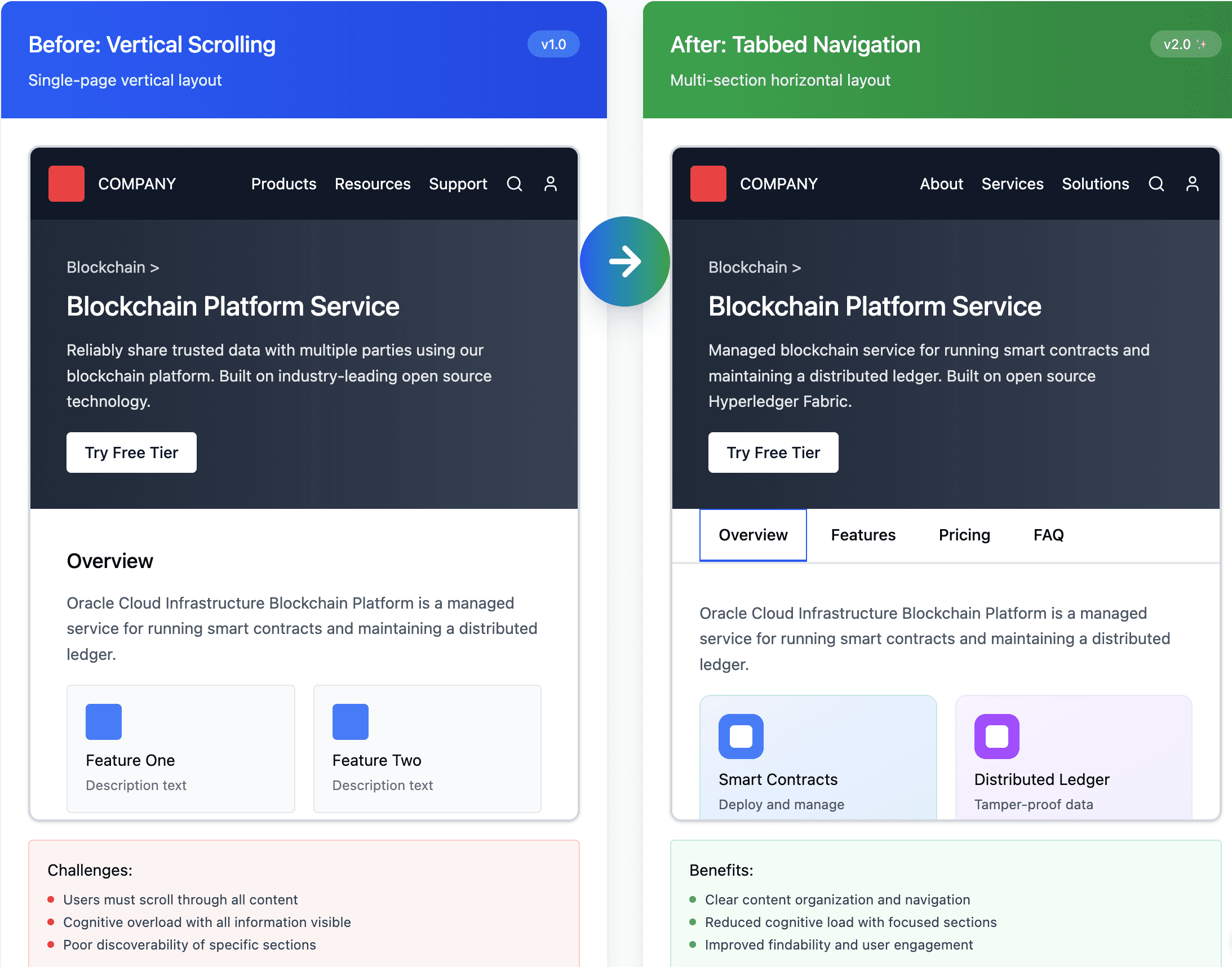
Information Architecture redesign
Access to information was hard to find in the old format, so in order to make content more upfront, we added a tabular fuction at the top that directly led to the most sought out information on the product. Drag to compare — tabbed structure reduced navigation friction and made information findable without scrolling
Customer stories: surfaced, not buried
Stories had no visual prominence and no clear path to more. I moved social proof above the fold, made cards directly clickable, and added context markers — timestamps, video indicators — so users knew what they were committing to before engaging.
A compact hero with a benefit-led headline, logo strip, and a single direct customer quote answered "why trust this?" before the buyer had committed to reading.
customer story redesign
In the old format, customer stories weren't linkable and it was hard to find the "see more customer stories tab". The focal point became the one story at the bottom. In the new format, you could click on the component directly and the see more customer stories button was more prominent on the right hand side. Drag to compare — customer validation moved above the fold, answering skepticism before it could form.
Industry-grouped use cases: making relevance findable
Use cases were a flat, ungrouped list. Users couldn't quickly answer "is this for someone like me?" I regrouped by vertical — finance, supply chain, healthcare — and introduced accordion flows so the scan happened at the industry level first, detail second. The interaction matched the actual mental model.
Use cases reorganized by industry with accordion flows. Sparse, generic use cases built out and organized by vertical — finance, supply chain, healthcare. Accordion UX let technical depth exist without overwhelming buyers who didn't need it.
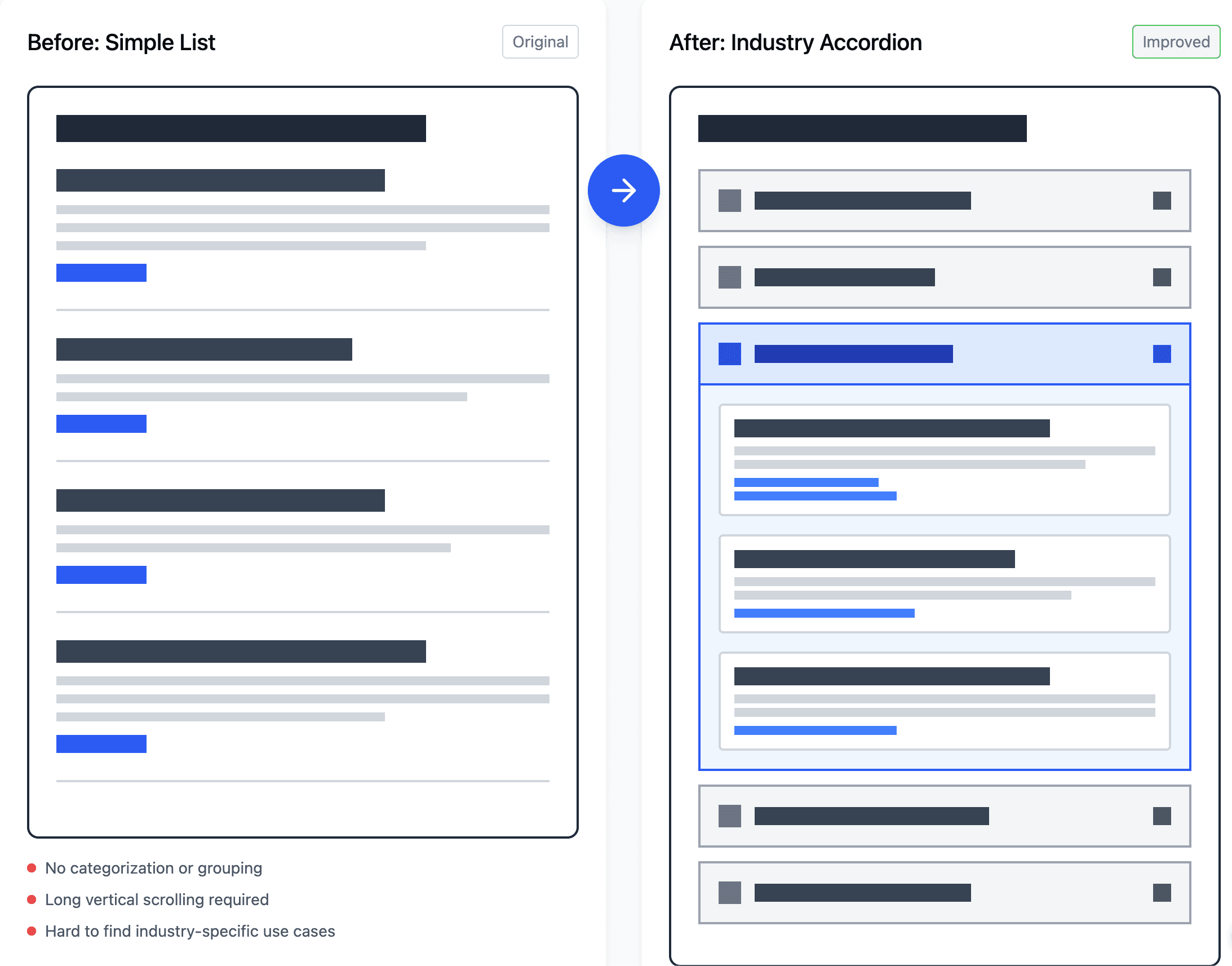
Access to information was hard to find in the old format, so in order to make content more upfront, we added a tabular fuction at the top that directly led to the most sought out information on the product.
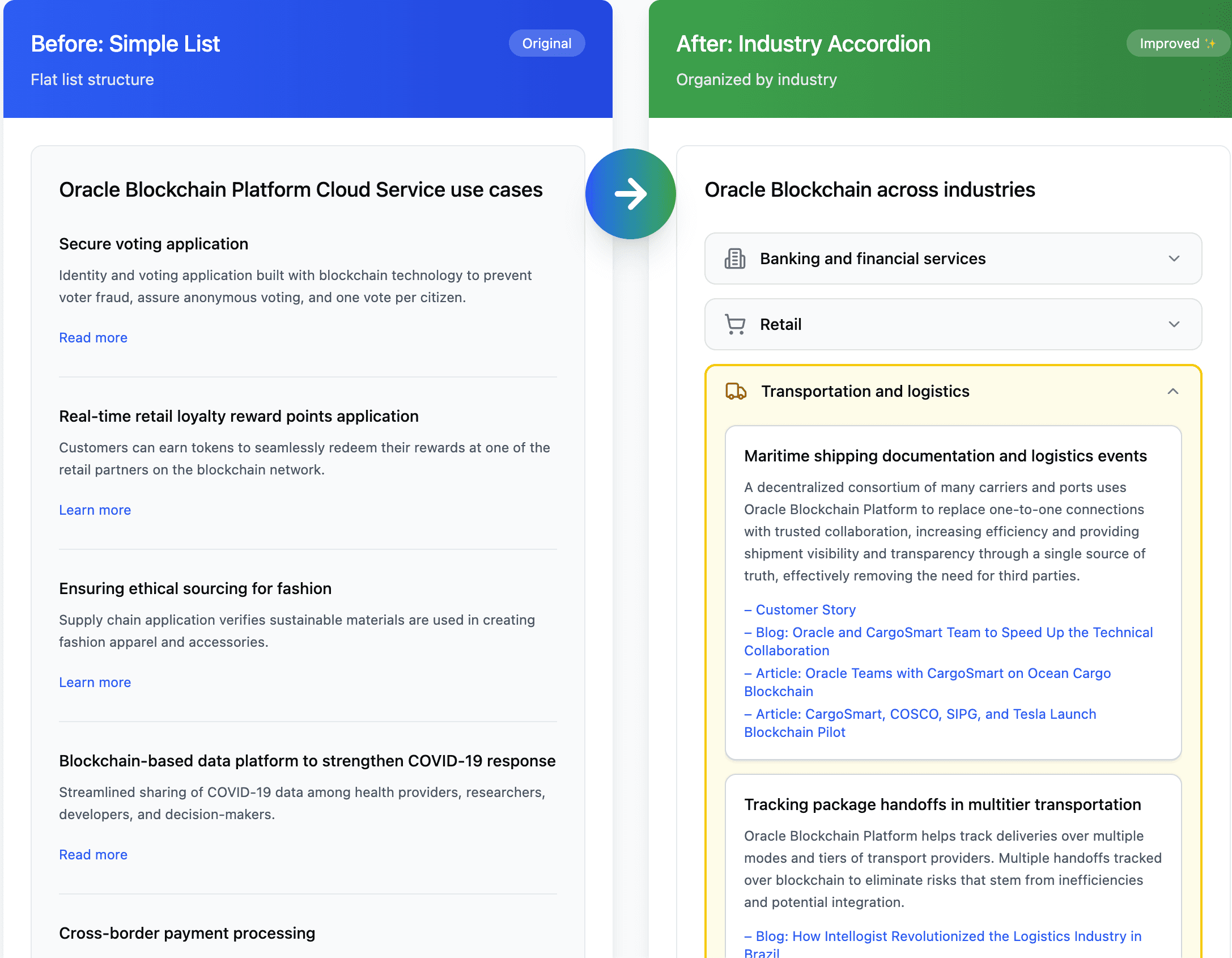
Industry use case redesign
Information was sparse and not intuitive in the old format. With the new industry organization and accordion UX flows, information was simplified. Drag to compare — industry groupings let buyers find their context, accordion flows kept depth available without imposing it
The Tradeoffs
WHAT WE GAVE UP
THe SYSTEM VIEW
Legibility isn't a property of content. It's a property of the disguised as a content problem.
The three changes addressed different moments in different readers' journeys. Together they created a page that could be technical without being exclusionary, and accessible without being reductive. Neither audience had to wade through content meant for the other.
This is what sequencing complexity means. Not removing it — letting each reader arrive at it on their own terms, through a path that first established why it mattered to them specifically.
OUTCOME
WHAT THIS CONFIRMED
Complexity doesn't need to be removed. It needs to be earned — given to readers only after they've been given a reason to want it.
The instinct on technical products is almost always to simplify. This project taught me that's the wrong framing. The goal isn't simplicity — it's sequencing. Give people a reason to care first. Then give them the complexity they came for.
The synergy between writing and design was the other thing this project made tangible. A tabular structure that groups content by industry was a writing decision. A header that leads with outcome instead of feature was a design decision. Together, both created a better user experience.
Thank you for reading!
Want to talk about Oracle or other projects? Lets chat!
DocuSign Case Study
How do you expand a product's identity when its identity is what made it successful?